OBSBOT launched the Tiny 3 in January 2026 with a tri-mic spatial audio system and physical PTZ motor tracking — the most capable AI webcam hardware released since the original Insta360 Link. Simultaneously, Insta360 expanded its lineup with the Link 2C Pro in early 2026, and Elgato’s Facecam 4K has settled into a price that makes it the value pick for creators serious about recording quality. The 4K webcam tier is now genuinely competitive in a way it wasn’t two years ago.
One clarification worth making upfront: Zoom, Google Meet, and Microsoft Teams all downscale incoming video to 1080p (or lower, depending on your plan and bandwidth). You will not see 4K resolution during a live call. What 4K sensors actually provide is a larger image sensor, which captures more light and produces a cleaner 1080p signal through downsampling. The practical result is that a 4K webcam looks noticeably better on video calls than a 1080p webcam at the same price — the upgrade is real, just not because of the resolution number.
Quick pick: The Logitech MX Brio is the right choice for most remote workers — accurate colors, solid noise-reducing mics, and plug-and-play simplicity. The Insta360 Link 2C is the obvious pick if budget matters, especially when it drops to $100–$110 on sale. For creators who record and stream, the Elgato Facecam 4K delivers the only true 4K@60fps option in this price range.
Comparison
| Spec | Logitech MX Brio | Insta360 Link 2C | Elgato Facecam 4K | Razer Kiyo Pro Ultra | OBSBOT Tiny 3 |
|---|---|---|---|---|---|
| Rating | 9.2/10 | 8.8/10 | 8.7/10 | 8.5/10 | 8.4/10 |
| Price | $198.99as of Oct 18, 2026 | Unavailable | $176.99as of Oct 18, 2026 | $311.48-$399.99as of Oct 18, 2026 | $296.00as of Oct 18, 2026 |
| Sensor | 8.5MP Sony STARVIS | 1/2" Sony Starlight | Sony STARVIS 2 CMOS | 1/1.2" Sony STARVIS 2 | 1/1.28" CMOS |
| Resolution | 4K@30fps / 1080p@60fps | 4K@30fps / 1080p@60fps | 4K@60fps / 1080p@60fps | 4K@24fps / 1080p@60fps | 4K@30fps / 120fps modes |
| Field of View | 90° (adjustable) | 79.5° DFOV | 90° | — | — |
| Microphones | Dual beam-forming noise-reducing | — | — | — | — |
| Connection | USB-C (detachable cable) | USB-C | Integrated USB-C | — | USB-C |
| Privacy | Built-in sliding shutter | — | — | Built-in rotating shutter ring | — |
| Weight | 175g | 111.5g with mount | — | ~220g | — |
| Features | — | AI auto-framing, gesture control | — | AI autofocus, face tracking | AI PTZ tracking, voice/gesture control |
| Modes | — | DeskView, Whiteboard, Portrait | — | — | DeskView, Whiteboard, Portrait, Stage |
| Lens Filter | — | — | 49mm standard thread | — | — |
| Software | — | — | Camera Hub (Mac/PC) | — | — |
| Dimensions | — | — | 104 x 54 x 52mm | — | — |
| Aperture | — | — | — | F/1.7 | — |
| Pixel Size | — | — | — | 2.9μm | — |
| Audio | — | — | — | — | Tri-mic spatial audio array |
| Launch | — | — | — | — | January 2026 |
| Check Price → | Check Price → | Check Price → | Check Price → | Check Price → |
Prices change daily — tap Check Price for the current Amazon price.
The Picks
1. Logitech MX Brio — Editor’s Pick
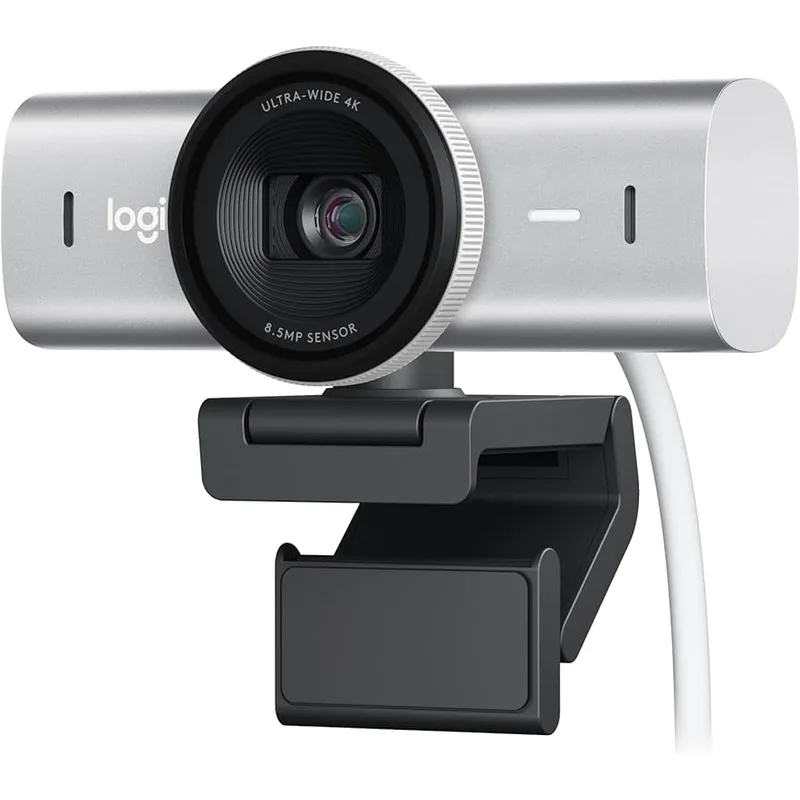
Logitech MX Brio
Pros
- Best-in-class color science with AI face-based image enhancement — skin tones render accurately across a wide range of lighting conditions without manual adjustment
- Dual noise-reducing microphones pick up voice clearly and reject keyboard clatter, HVAC noise, and background conversations
- Show Mode flips the image when tilted downward — useful for sharing documents and products in live meetings without a document camera
- USB-C connection with detachable cable keeps desk clean and eliminates proprietary cord frustration
- Built-in sliding privacy shutter physically blocks the lens — more reliable than software-only approaches
Cons
- Tops out at 4K@30fps — no 4K@60fps option unlike the Elgato Facecam 4K
- AI image enhancement is tuned conservatively; content creators who want full manual control will prefer the Elgato
- No PTZ (pan-tilt-zoom) capability — stays fixed wherever you point it
The MX Brio is the webcam Logitech should have shipped instead of the original Brio 4K. Where the older model produced decent but flat-looking video, the MX Brio’s 8.5MP Sony STARVIS sensor and AI face-based image enhancement produce skin tones that actually look like skin tones — warm and natural across incandescent, LED, and natural light without any manual color temperature adjustment.
The dual beam-forming microphones are the second reason to buy this. They reduce ambient noise and focus pickup on the speaker’s voice, which means background noise — keyboard clicks, air conditioning, street traffic — is rejected before it reaches the call. This is the right baseline for remote workers who are on calls frequently and don’t want to add a separate microphone to the desk.
Show Mode is an underrated feature. When you tilt the camera downward past a threshold, it flips the image to create an overhead shot — useful for showing physical items, sketching on paper, or sharing a physical document during a meeting. It’s a practical alternative to a $100+ document camera for occasional use.
The USB-C connection with a detachable cable is a small but meaningful detail. The original Brio used a fixed USB-A cable; the MX Brio’s removable cable means a broken cable is a $5 fix, not a $199 webcam replacement.
Who should buy this: Remote workers who want the best image quality without configuring software, anyone who relies on voice calls and wants the noise rejection handled automatically, and MacBook users who value plug-and-play reliability.
Who should skip this: Content creators who need 4K@60fps, users who want physical PTZ tracking, or anyone whose primary environment has good controlled lighting who can extract more from the Elgato’s manual controls.
2. Insta360 Link 2C — Best Value
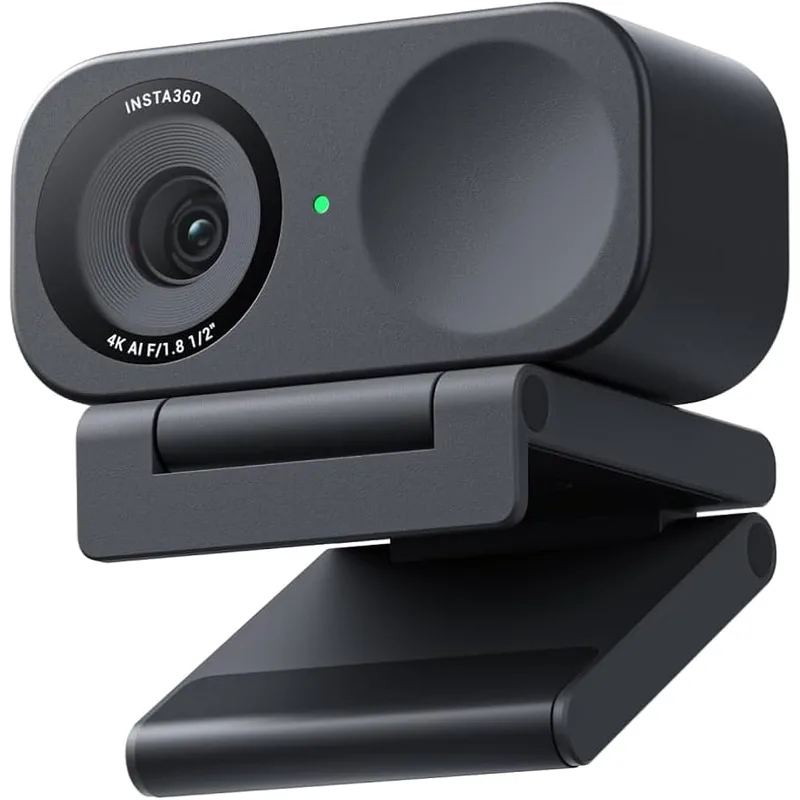
Insta360 Link 2C
Pros
- Most versatile 4K webcam at this price — DeskView, Whiteboard, and Portrait modes are genuinely useful for remote presentations and client calls
- AI auto-framing adjusts the crop to keep you centered as you move, without any physical motor noise or lag
- Compact enough to pack in a laptop bag — useful for hotdesking and travel
- Gesture controls trigger recording and zoom adjustments without touching the camera or keyboard
- Regularly drops to $100–$110 on sale, making it the easiest 4K upgrade decision at any budget
Cons
- 79.5° FOV is narrower than most competitors — less flattering for wide-desk setups or showing context behind you
- Built-in microphone is serviceable but not impressive; a separate mic is recommended for client calls that matter
- Gesture control recognition is inconsistent in bright backlit environments
At $149 — and frequently $100–$110 on sale — the Link 2C offers more AI-powered features than webcams that cost twice as much. The camera supports DeskView (flips overhead for document sharing), Whiteboard Mode (corrects keystone distortion on whiteboards and monitors), Portrait Mode (vertical crop for social media), and AI auto-framing that adjusts digitally as you move.
The auto-framing is the most practically useful feature for remote work. If you tend to shift in your chair, lean forward when reviewing something on screen, or move around during calls, the Link 2C keeps you centered in the frame without requiring you to reposition the camera. The adjustment is digital, so there is no motor noise — it recrops and smooths between positions.
The 1/2-inch Sony Starlight sensor produces genuinely good 4K video. Not Razer Kiyo Pro Ultra good — the Insta360 sensor is half the area — but clearly better than typical 1080p webcams in the same price band. Downsampled to 1080p for video calls, the image is clean and detailed.
Build quality is compact and portable. The magnetic mount is simple to attach and remove from a monitor top, and the entire unit fits in a laptop bag side pocket. For remote workers who travel or use multiple workspaces, the Link 2C’s portability is a genuine advantage.
Who should buy this: Budget-conscious remote workers who want AI auto-framing and DeskView features, anyone setting up a first home office who wants 4K quality without overspending, and hybrid workers who move between multiple locations.
Who should skip this: Users who need wide-angle coverage behind them (79.5° FOV is noticeably narrower than 90°+ competitors), or anyone who prioritizes built-in microphone quality over camera features.
3. Elgato Facecam 4K — Best for Creators
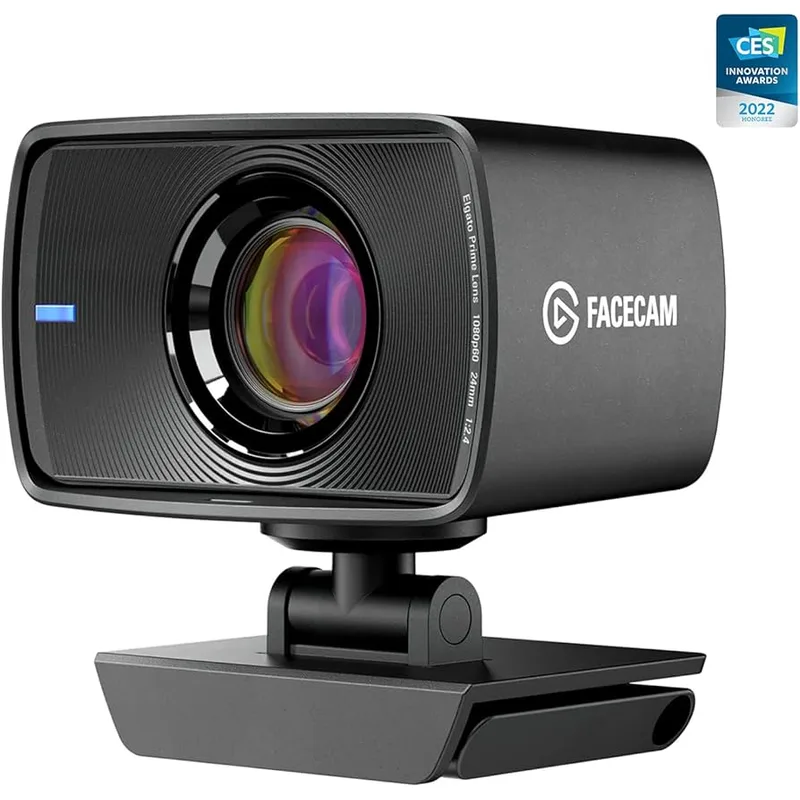
Elgato Facecam 4K
Pros
- Only webcam in this roundup to support true 4K@60fps — noticeable difference for recording and streaming even if video calls downscale to 1080p
- Camera Hub software provides DSLR-style manual control over ISO, shutter speed, white balance, and focus without touching the lens
- 49mm standard lens filter thread opens up the option to add ND filters, polarizers, or anamorphic attachments
- Uncompressed video output over USB-C means zero compression artifacts in recordings — important for anyone editing webcam footage in post
- Hit a sale low of $160 in February 2026 — worth setting a price alert if you're patient
Cons
- No built-in microphone — you must use an external mic, laptop mic, or headset for audio
- Manual-first software requires setup time; plug-and-play image quality is average without Camera Hub configuration
- Integrated (non-detachable) USB-C cable complicates cable management on tight desks
The Facecam 4K is the only webcam in this roundup with a true 4K@60fps output — and for video call use, that largely doesn’t matter. For recording and streaming, it matters significantly.
The Sony STARVIS 2 sensor paired with Elgato’s Camera Hub software gives you manual control over ISO, shutter speed, white balance, focus mode, and lens correction. This is the webcam equivalent of shooting in manual mode on a DSLR: more setup required, better output when configured correctly. For creators who produce YouTube content, Twitch streams, or client-facing recorded demos, the ability to match the camera’s settings to the room’s lighting conditions produces noticeably more professional footage than auto-everything modes.
The 49mm standard filter thread is a distinguishing hardware feature. Polarizing filters reduce glare from windows. ND filters let you control exposure in bright environments. Anamorphic adapters produce a cinematic aspect ratio. These are niche features, but they’re not available on any competing webcam.
Uncompressed video output over USB-C means the captured footage has no compression artifacts — cleaner for color correction in DaVinci Resolve or Premiere Pro compared to the compressed stream most webcams deliver.
The notable limitation: no built-in microphone. This is a deliberate trade-off — the space and power budget go to image quality. Every Elgato Facecam 4K owner needs a separate audio solution. That adds cost, but it usually results in better audio than any built-in webcam microphone anyway.
Who should buy this: Streamers, YouTubers, and remote workers who record video content alongside live calls. Anyone who wants to treat their webcam as a production camera rather than a convenience device.
Who should skip this: Remote workers who want a simple plug-and-play setup. Without Camera Hub configuration, the Facecam 4K’s default auto-mode image is average — the value only emerges with manual tuning.
4. Razer Kiyo Pro Ultra — Best Low-Light
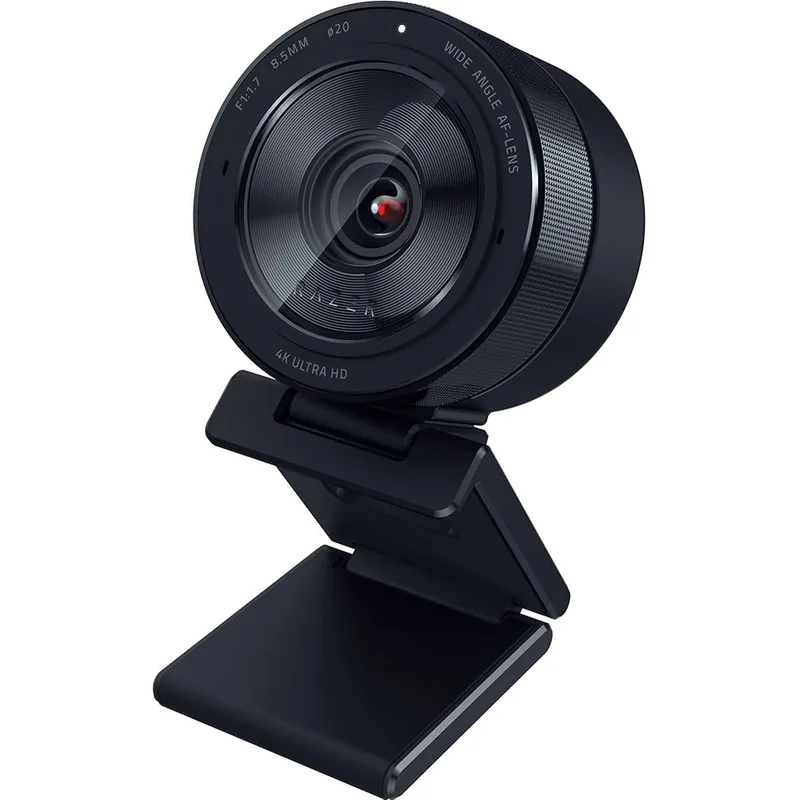
Razer Kiyo Pro Ultra
Pros
- 1/1.2-inch sensor with F/1.7 aperture is the largest optical setup in any consumer webcam — low-light performance clearly outclasses every other option in this roundup
- 2.9μm pixel size captures noticeably more detail and dynamic range in mixed lighting (sunlit background, dim room)
- AI autofocus tracks face position smoothly and quickly; repositioning doesn't cause the soft-focus lag common in mid-range webcams
- Built-in rotating shutter ring physically blocks the lens with a tactile click — more satisfying and reliable than a slider
- Raw image quality before any AI processing is exceptional — ideal for users who post-process webcam footage
Cons
- 4K is limited to 24fps — videos have a cinematic look, but motion during fast head movements looks choppy at 24fps
- Synapse software is required for fine-tuning and can feel heavy for a webcam configuration tool
- Built-in microphone is average and tinny — not recommended for professional calls without an external audio solution
- Most expensive option at $349–$399; value case weakens if you're not actively using the low-light advantage
The Razer Kiyo Pro Ultra has the largest sensor and widest aperture of any consumer webcam currently available: a 1/1.2-inch Sony STARVIS 2 chip with an F/1.7 aperture and 2.9μm pixel size. Those numbers translate to a camera that works in lighting conditions where every other webcam in this roundup produces a noisy, underexposed image.
The practical scenario: if your home office has a window behind you, or your lighting setup varies throughout the day, or you work in a room without controlled overhead light, the Kiyo Pro Ultra handles those conditions with a margin that nothing else at this price can match. The large sensor captures more photons; the F/1.7 aperture lets more light in before boosting ISO gain; the result is cleaner, brighter video without artificial processing.
AI autofocus is smooth and responsive — tracking face position without the soft-focus hunting period that cheaper webcams exhibit when your head moves. Face tracking adjusts the crop automatically if you want that feature; it can also be disabled for a static wide shot.
The 4K@24fps cap is the significant hardware limitation. 24fps produces a cinematic look in controlled environments, but during fast head movements or quick scene changes, motion can look choppy compared to 30fps or 60fps. For video calls this is largely unnoticeable; for recording content where you move expressively, it’s worth knowing.
Who should buy this: Remote workers in challenging lighting environments — home offices with windows behind them, rooms with inconsistent natural light, or anyone who refuses to invest in dedicated ring lights but still wants a good-looking call image.
Who should skip this: Content creators who need 4K@30fps or 4K@60fps smooth motion. The sensor quality is unmatched; the frame rate ceiling is a real constraint.
5. OBSBOT Tiny 3 — Best AI Tracking
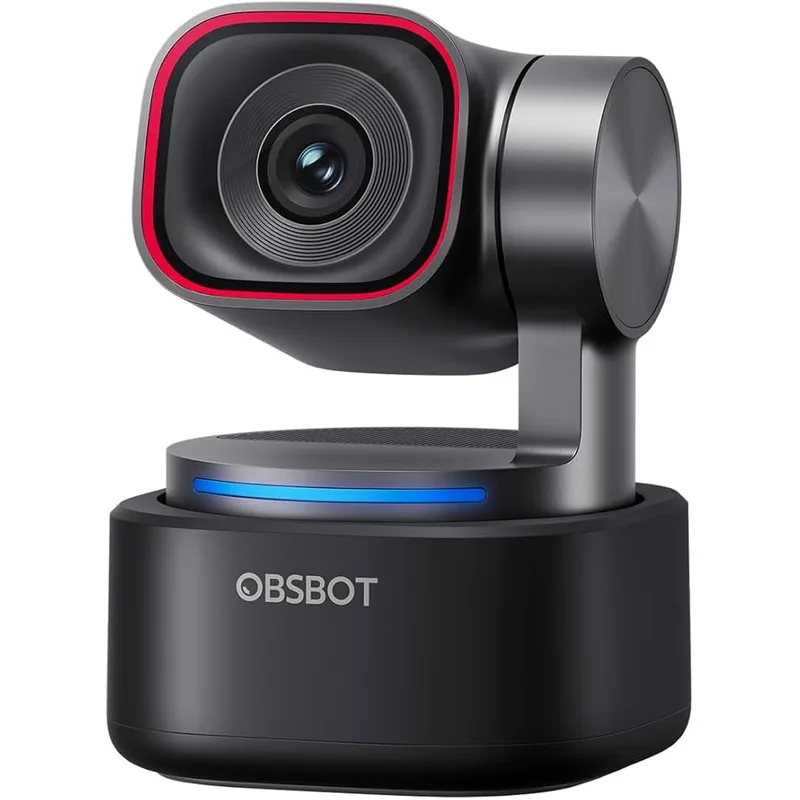
OBSBOT Tiny 3
Pros
- Physical PTZ (pan-tilt-zoom) motor tracks you across the room — the camera literally follows you if you stand up and walk to a whiteboard during a meeting
- Tri-mic spatial audio array is the best built-in webcam microphone in this roundup — captures voice from multiple directions with spatial noise rejection
- 120fps high-frame-rate mode is genuinely useful for recording smooth motion for tutorials, demos, and training content
- Voice command control ("OBSBOT, zoom in") works hands-free without software or app open — useful mid-presentation
- Launched in January 2026 with Nintendo Switch 2 compatibility — niche, but shows OBSBOT is keeping the platform current
Cons
- Most expensive option at $349 — costs more than many USB microphones that would outperform its built-in audio
- PTZ motor is audible in quiet rooms if you're on a call without a headset
- 4K@30fps only; the 120fps mode drops to lower resolutions — not a full 4K@120 implementation
- App and firmware update cadence is less predictable than Logitech or Elgato
The OBSBOT Tiny 3 launched in January 2026 as the first webcam with a tri-mic spatial audio system paired with physical PTZ (pan-tilt-zoom) motor tracking. The combination means the camera physically moves to follow you around the room, and its three-microphone array picks up audio from the direction it’s facing.
The PTZ motor is the headline feature. If you present on calls, stand at a whiteboard, or move around while talking — the Tiny 3 tracks your face and physically pans and tilts to keep you centered. This is a fundamentally different experience from digital auto-framing (which recrops a fixed field) — the Tiny 3 has a 60° tilt range and can pivot to follow you to a second location in the room.
Voice commands work without the app running. Saying “OBSBOT, zoom in” or “OBSBOT, track me” while on a call executes the command without touching the keyboard. For presentations where you’re sharing a screen and talking simultaneously, hands-free camera control removes one source of meeting friction.
The 120fps mode deserves context: it drops resolution below 4K to achieve that frame rate. It’s not 4K@120fps — it’s a high-speed mode for smooth slow-motion recording at lower resolution. For tutorials and product demos, useful. Don’t buy this expecting 4K high-frame-rate video.
The PTZ motor produces slight noise in very quiet rooms. With a headset or in a normal office environment, it’s inaudible to call participants. In a silent room with a standalone microphone, the motor movement during tracking might be picked up.
Who should buy this: Remote workers who present frequently, educators and trainers who move around while teaching, and content creators who want to capture natural movement without being locked to a fixed frame.
Who should skip this: Anyone who sits at a desk and talks to a fixed camera all day — the PTZ motor tracking adds cost for a feature that stationary users gain nothing from.
Buying Guide: How to Choose a 4K Webcam
Does 4K Actually Matter for Video Calls?
No platform currently delivers 4K resolution in real-time video calls. Zoom maxes out at 1080p, Google Meet and Microsoft Teams cap at 1080p for most accounts. So why buy 4K?
Two reasons. First, larger 4K sensors capture more light and detail even when the output is downsampled to 1080p — the resulting image is cleaner and sharper than a native 1080p sensor can produce. Second, if you record or stream content, 4K gives you real resolution headroom for editing and future-proofing.
Sensor Size vs. Megapixels
A 1/1.2-inch sensor at 8 megapixels produces better low-light images than a 1/3-inch sensor at 12 megapixels. Larger sensors collect more light per pixel — a concept called pixel size (measured in μm). When comparing webcams, sensor size and aperture are more useful metrics than megapixel count.
The Razer Kiyo Pro Ultra’s 1/1.2-inch, F/1.7 combination is clearly the best optical setup in this roundup. The OBSBOT Tiny 3’s 1/1.28-inch sensor is close behind. The Logitech MX Brio and Insta360 Link 2C use smaller sensors, but compensate with effective AI processing.
Built-In Microphones: Acceptable vs. Good
Every webcam in this roundup has built-in microphones except the Elgato Facecam 4K. “Acceptable” describes the Insta360 Link 2C and Razer Kiyo Pro Ultra — voice is captured clearly, but background noise rejection and voice presence are noticeably worse than even a $60 desktop USB microphone. The Logitech MX Brio is better than average. The OBSBOT Tiny 3’s tri-mic array is the best built-in webcam audio in this roundup.
If audio quality matters for your work — client calls, recorded meetings, content creation — a separate microphone upgrades your audio more significantly than a webcam upgrade upgrades your video.
AI Features: Marketing vs. Practical
Three AI features are genuinely useful: auto-framing (keeps you centered as you move), face-based exposure (adjusts brightness based on your face rather than the whole scene), and noise reduction (filters ambient sound from the microphone).
Three AI features that are more marketing: background replacement at webcam quality (still looks artificial compared to a green screen), facial beautification (often produces uncanny smoothing), and eye contact correction (works at best 60% of the time on current hardware).
Connection: USB-A vs. USB-C
Modern laptops have USB-C ports; desktop users often still have USB-A. All webcams in this roundup use USB-C connections, either directly or via included adapters. Check that your computer has a USB-C port that provides enough bandwidth — USB 3.0 or later for 4K output.
FAQ
Will a 4K webcam improve my Zoom or Teams calls?
Yes, but not because of the resolution. Major video conferencing platforms cap streams at 1080p, so callers will not see 4K. The improvement comes from 4K webcams having larger sensors that produce a cleaner, sharper 1080p image through downsampling. The practical difference compared to a budget 1080p webcam is noticeable; the difference compared to a good 1080p webcam is more subtle.
Do I need good lighting to get value from a 4K webcam?
It depends on the webcam. The Razer Kiyo Pro Ultra’s F/1.7 aperture and large sensor genuinely perform in poor lighting. The Insta360 Link 2C and Logitech MX Brio benefit from decent ambient light. A $30 ring light or a lamp placed at eye level will improve any webcam’s output significantly — often more than upgrading the camera itself.
What’s the difference between digital zoom and PTZ?
Digital zoom crops the existing camera image and enlarges the crop — no moving parts, but image quality degrades as you zoom in. PTZ (pan-tilt-zoom) physically moves the camera lens using a motor, maintaining full sensor quality at any zoom level. The OBSBOT Tiny 3’s PTZ tracking follows you physically around the room; the Insta360 Link 2C’s auto-framing is digital recroping. Both look similar on a video call at moderate zoom levels, but PTZ maintains quality at extreme zoom.
Should I buy a webcam with a built-in microphone or add a separate one?
If you’re on casual calls and occasional meetings, a good built-in microphone (Logitech MX Brio, OBSBOT Tiny 3) is sufficient. If audio quality affects your professional reputation — client calls, recorded content, meetings with 10+ people — add a dedicated USB microphone. A $60–$80 USB mic from HyperX or Audio-Technica will outperform the built-in mics on any webcam at any price.
Is the Elgato Facecam 4K worth it without a microphone?
Yes, if you already own a microphone or headset. The Facecam 4K’s value is in its 4K@60fps output, uncompressed recording, and Camera Hub software — all of which reward users who record or stream content. For video calls only, the missing microphone is more disqualifying since you need to budget for audio separately.
Conclusion
The Logitech MX Brio earns the top spot for most remote workers: accurate image quality, solid noise-reducing microphones, and a USB-C setup that just works without configuration. At $199, it covers every baseline requirement for professional video calls.
The Insta360 Link 2C at $149 is the better choice if budget is a priority or if you want AI auto-framing and multi-mode flexibility — especially when it drops to $100–$110 on sale.
Content creators should go directly to the Elgato Facecam 4K for 4K@60fps and Camera Hub’s manual control. Users in consistently poor lighting should look at the Razer Kiyo Pro Ultra — its large sensor and F/1.7 aperture address lighting problems that no amount of AI processing can fully compensate for.
The OBSBOT Tiny 3 is the right choice if you move while presenting — physical PTZ tracking and spatial audio from its tri-mic array are features no other webcam at any price currently matches.
Detailed Reviews
Logitech MX Brio
Pros
- Best-in-class color science with AI face-based image enhancement — skin tones render accurately across a wide range of lighting conditions without manual adjustment
- Dual noise-reducing microphones pick up voice clearly and reject keyboard clatter, HVAC noise, and background conversations
- Show Mode flips the image when tilted downward — useful for sharing documents and products in live meetings without a document camera
- USB-C connection with detachable cable keeps desk clean and eliminates proprietary cord frustration
- Built-in sliding privacy shutter physically blocks the lens — more reliable than software-only approaches
Cons
- Tops out at 4K@30fps — no 4K@60fps option unlike the Elgato Facecam 4K
- AI image enhancement is tuned conservatively; content creators who want full manual control will prefer the Elgato
- No PTZ (pan-tilt-zoom) capability — stays fixed wherever you point it
Insta360 Link 2C
Pros
- Most versatile 4K webcam at this price — DeskView, Whiteboard, and Portrait modes are genuinely useful for remote presentations and client calls
- AI auto-framing adjusts the crop to keep you centered as you move, without any physical motor noise or lag
- Compact enough to pack in a laptop bag — useful for hotdesking and travel
- Gesture controls trigger recording and zoom adjustments without touching the camera or keyboard
- Regularly drops to $100–$110 on sale, making it the easiest 4K upgrade decision at any budget
Cons
- 79.5° FOV is narrower than most competitors — less flattering for wide-desk setups or showing context behind you
- Built-in microphone is serviceable but not impressive; a separate mic is recommended for client calls that matter
- Gesture control recognition is inconsistent in bright backlit environments
Elgato Facecam 4K
Pros
- Only webcam in this roundup to support true 4K@60fps — noticeable difference for recording and streaming even if video calls downscale to 1080p
- Camera Hub software provides DSLR-style manual control over ISO, shutter speed, white balance, and focus without touching the lens
- 49mm standard lens filter thread opens up the option to add ND filters, polarizers, or anamorphic attachments
- Uncompressed video output over USB-C means zero compression artifacts in recordings — important for anyone editing webcam footage in post
- Hit a sale low of $160 in February 2026 — worth setting a price alert if you're patient
Cons
- No built-in microphone — you must use an external mic, laptop mic, or headset for audio
- Manual-first software requires setup time; plug-and-play image quality is average without Camera Hub configuration
- Integrated (non-detachable) USB-C cable complicates cable management on tight desks
Razer Kiyo Pro Ultra
Pros
- 1/1.2-inch sensor with F/1.7 aperture is the largest optical setup in any consumer webcam — low-light performance clearly outclasses every other option in this roundup
- 2.9μm pixel size captures noticeably more detail and dynamic range in mixed lighting (sunlit background, dim room)
- AI autofocus tracks face position smoothly and quickly; repositioning doesn't cause the soft-focus lag common in mid-range webcams
- Built-in rotating shutter ring physically blocks the lens with a tactile click — more satisfying and reliable than a slider
- Raw image quality before any AI processing is exceptional — ideal for users who post-process webcam footage
Cons
- 4K is limited to 24fps — videos have a cinematic look, but motion during fast head movements looks choppy at 24fps
- Synapse software is required for fine-tuning and can feel heavy for a webcam configuration tool
- Built-in microphone is average and tinny — not recommended for professional calls without an external audio solution
- Most expensive option at $349–$399; value case weakens if you're not actively using the low-light advantage
OBSBOT Tiny 3
Pros
- Physical PTZ (pan-tilt-zoom) motor tracks you across the room — the camera literally follows you if you stand up and walk to a whiteboard during a meeting
- Tri-mic spatial audio array is the best built-in webcam microphone in this roundup — captures voice from multiple directions with spatial noise rejection
- 120fps high-frame-rate mode is genuinely useful for recording smooth motion for tutorials, demos, and training content
- Voice command control ("OBSBOT, zoom in") works hands-free without software or app open — useful mid-presentation
- Launched in January 2026 with Nintendo Switch 2 compatibility — niche, but shows OBSBOT is keeping the platform current
Cons
- Most expensive option at $349 — costs more than many USB microphones that would outperform its built-in audio
- PTZ motor is audible in quiet rooms if you're on a call without a headset
- 4K@30fps only; the 120fps mode drops to lower resolutions — not a full 4K@120 implementation
- App and firmware update cadence is less predictable than Logitech or Elgato